> ## Documentation Index
> Fetch the complete documentation index at: https://docs.trusapien.com/llms.txt
> Use this file to discover all available pages before exploring further.
# Agents
> Browse 77 pre-configured specialist Agents across 11 departments, organized by function and ready to work
Every Agent in Trusapien is built for a specific job. Market research, competitive analysis, financial reporting, contract review, communications planning, and dozens more. Each one is pre-configured with the expertise it needs. You choose the right Agent and start working.
 ## Browsing the catalog
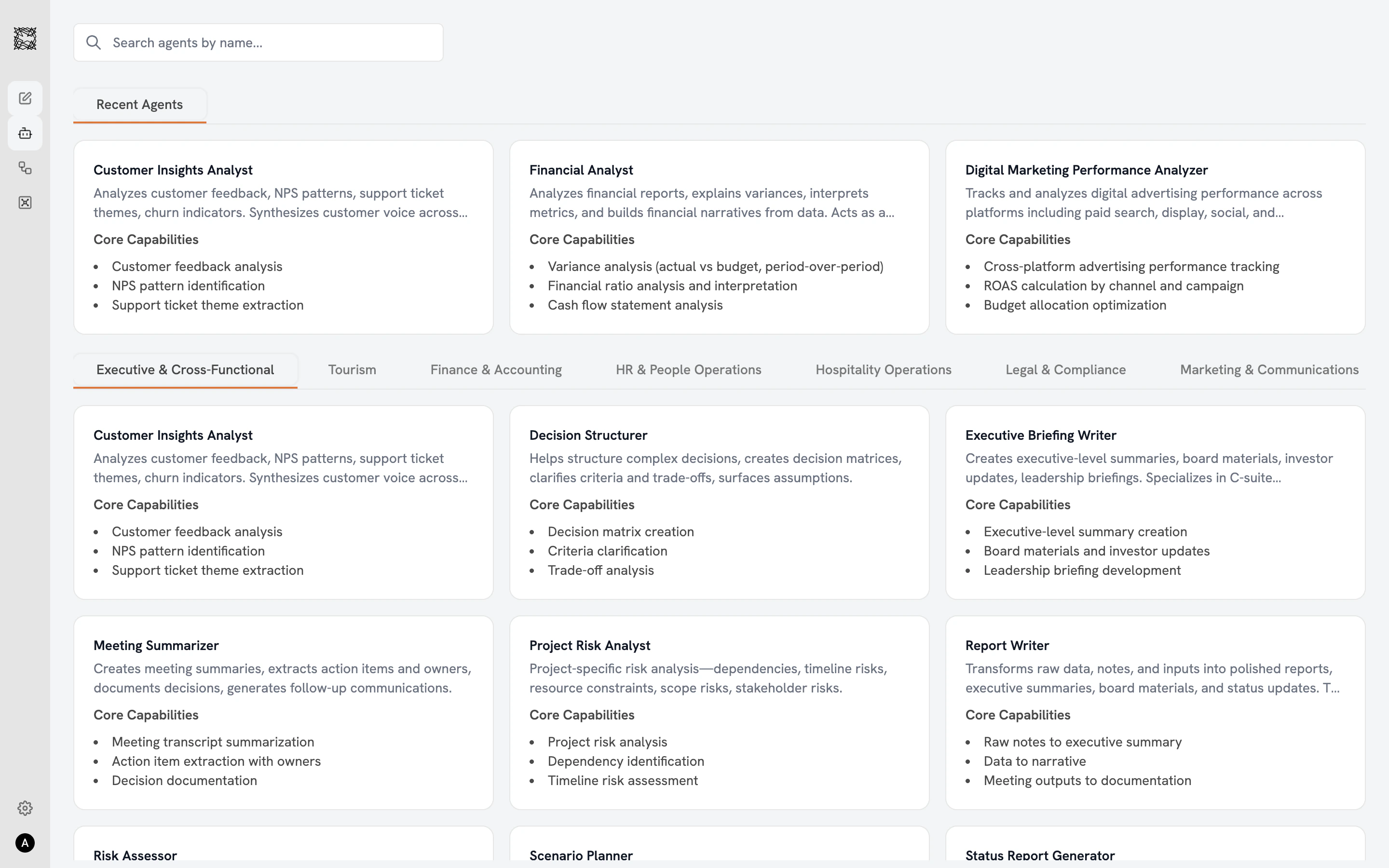
The Agent catalog displays all 77 Agents in a three-column card grid. A **search bar** at the top lets you find Agents by name. The **"Recent Agents"** row shows Agents you have worked with recently (personalized to you). **Department filter tabs** across the top let you browse by function: Executive & Cross-Functional, Tourism, Finance & Accounting, HR & People Operations, Hospitality Operations, Legal & Compliance, Marketing & Communications, Operations & Procurement, Product & Technology, Strategy & Research, and Sales & Business Development.
Each Agent card shows the Agent's name, a one-to-two sentence description, and three to four core capabilities. Click any card to open the detail view.
## Selecting an Agent
The detail view shows three sections:
* **Use Cases**: Five example prompts showing what this Agent does best. Use them directly or adapt to your specific task.
* **Core Capabilities** (green checkmarks): The full list of skills this Agent brings to every conversation.
* **Limitations / Quality Standards** (red indicators): What to keep in mind when reviewing results. Some Agents note data requirements; others set quality benchmarks.
Click **"Work with Agent"** to start a new conversation.
Agent conversations include four capability icons in the input bar: Attachment, Actions & MCP, Deep Research, and Knowledge Grounding. For Web Search, Data & Graph, and the Agent selector, start a regular conversation from the Chat home screen.
## Getting better results
* **Be specific.** Describe the task, the audience, and the format you want.
* **Attach context.** Upload files or enable Knowledge Grounding to give your Agent access to relevant data.
* **Save Memories.** Go to **Settings > Personalization** to store notes about your preferences. Your Agents reference these automatically.
* **Use the right specialist.** A budget question goes to the Financial Analyst. A contract review goes to the Contract Reviewer.
What to expect when you start a conversation
When you need multiple Agents working together
## Browsing the catalog
The Agent catalog displays all 77 Agents in a three-column card grid. A **search bar** at the top lets you find Agents by name. The **"Recent Agents"** row shows Agents you have worked with recently (personalized to you). **Department filter tabs** across the top let you browse by function: Executive & Cross-Functional, Tourism, Finance & Accounting, HR & People Operations, Hospitality Operations, Legal & Compliance, Marketing & Communications, Operations & Procurement, Product & Technology, Strategy & Research, and Sales & Business Development.
Each Agent card shows the Agent's name, a one-to-two sentence description, and three to four core capabilities. Click any card to open the detail view.
## Selecting an Agent
The detail view shows three sections:
* **Use Cases**: Five example prompts showing what this Agent does best. Use them directly or adapt to your specific task.
* **Core Capabilities** (green checkmarks): The full list of skills this Agent brings to every conversation.
* **Limitations / Quality Standards** (red indicators): What to keep in mind when reviewing results. Some Agents note data requirements; others set quality benchmarks.
Click **"Work with Agent"** to start a new conversation.
Agent conversations include four capability icons in the input bar: Attachment, Actions & MCP, Deep Research, and Knowledge Grounding. For Web Search, Data & Graph, and the Agent selector, start a regular conversation from the Chat home screen.
## Getting better results
* **Be specific.** Describe the task, the audience, and the format you want.
* **Attach context.** Upload files or enable Knowledge Grounding to give your Agent access to relevant data.
* **Save Memories.** Go to **Settings > Personalization** to store notes about your preferences. Your Agents reference these automatically.
* **Use the right specialist.** A budget question goes to the Financial Analyst. A contract review goes to the Contract Reviewer.
What to expect when you start a conversation
When you need multiple Agents working together