> ## Documentation Index
> Fetch the complete documentation index at: https://docs.trusapien.com/llms.txt
> Use this file to discover all available pages before exploring further.
# Actions & MCP
> 5 pre-configured integrations and custom MCP servers let your Agents search, create, and take action across your tools
Actions let your Agents interact with external tools beyond conversation. Through MCP (Model Context Protocol), your Agents can search, create, update, and take action in connected systems. Trusapien comes with five pre-configured integrations ready to connect, and supports any custom MCP server for tools not in the list.
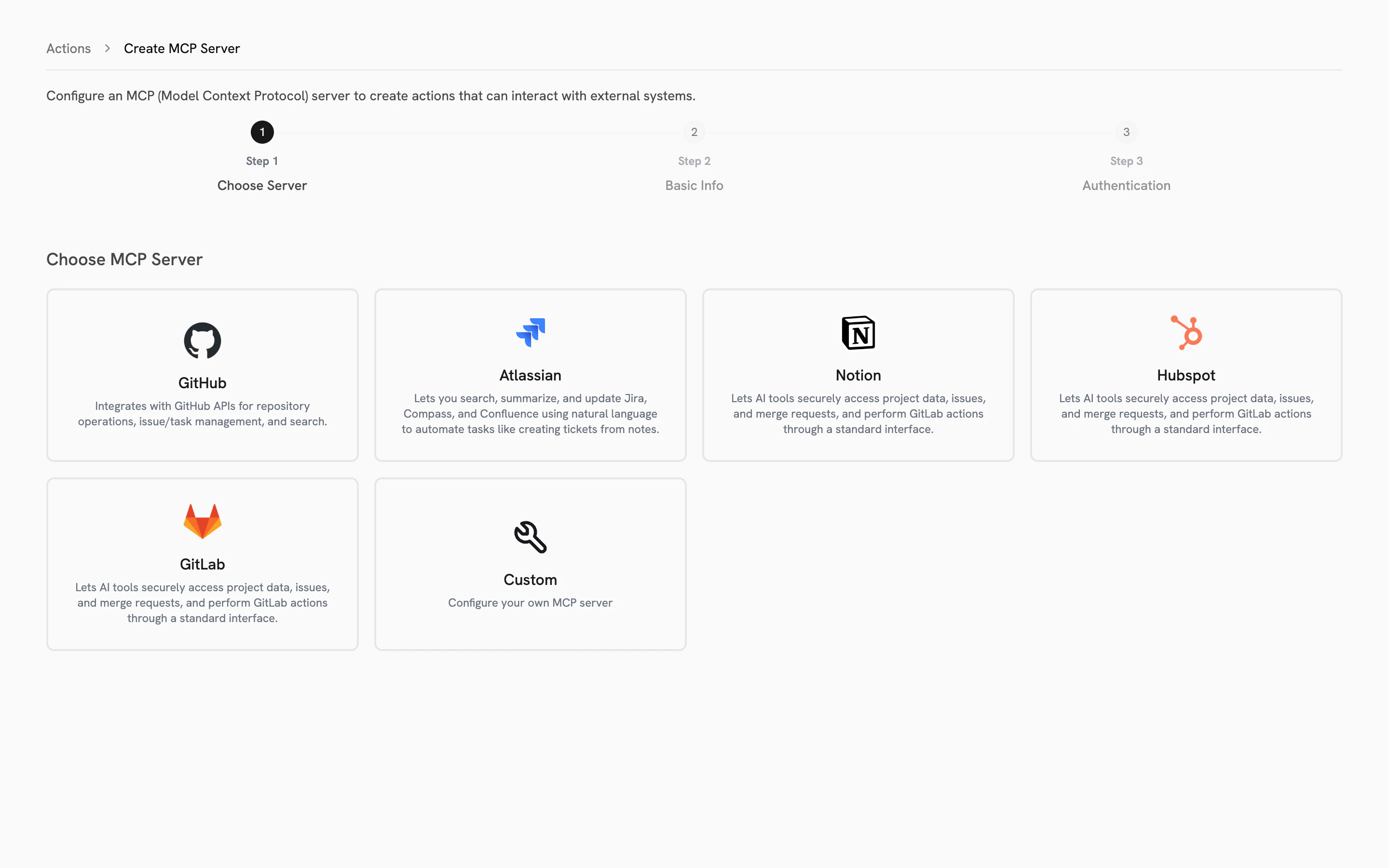 ## Pre-configured integrations
Five MCP servers are ready to connect out of the box. The connection URL and transport protocol are already configured. You only need to provide authentication.
| Integration | What your Agents can do |
| ------------- | --------------------------------------------------------------------- |
| **GitHub** | Search repositories, manage issues, track pull requests |
| **Atlassian** | Search and update Jira tickets, browse Confluence pages, create tasks |
| **Notion** | Access pages, databases, and project information |
| **HubSpot** | Work with contacts, deals, and marketing data |
| **GitLab** | Access projects, issues, merge requests, and repository data |
You can also connect any **custom MCP server** for additional tools your organization uses.
Pre-configured integrations are a Trusapien differentiator. Most platforms require you to set up MCP connections from scratch. Trusapien's five official servers come with pre-filled URLs and transport settings, so you only configure authentication.
## Setting up an Action
The setup wizard walks you through three steps:
Select from the five pre-configured integrations or choose Custom. Pre-configured servers display their name and a description of what they connect to.
Name your Action, add a description, and confirm the server URL. For pre-configured servers, the URL and transport (Streamable HTTP or SSE) are already filled in and locked. For Custom servers, enter your MCP server URL and select the transport.
Choose from three authentication types: **None** (no credentials needed), **API Token** (enter your token), or **OAuth** (configure Client ID, Client Secret, and scopes). Pre-configured servers guide you toward the correct authentication method for that service.
Once configured, your Action appears in the chat input bar under the Actions icon (play button). A checkmark indicates it is active and available to your Agents.
Access Actions setup at **Settings > Actions**, or click the play button icon in the chat input bar and select **"More Actions"** to go directly to the Actions management page.
Search your connected data sources
Connect 39 data sources for Knowledge Grounding
## Pre-configured integrations
Five MCP servers are ready to connect out of the box. The connection URL and transport protocol are already configured. You only need to provide authentication.
| Integration | What your Agents can do |
| ------------- | --------------------------------------------------------------------- |
| **GitHub** | Search repositories, manage issues, track pull requests |
| **Atlassian** | Search and update Jira tickets, browse Confluence pages, create tasks |
| **Notion** | Access pages, databases, and project information |
| **HubSpot** | Work with contacts, deals, and marketing data |
| **GitLab** | Access projects, issues, merge requests, and repository data |
You can also connect any **custom MCP server** for additional tools your organization uses.
Pre-configured integrations are a Trusapien differentiator. Most platforms require you to set up MCP connections from scratch. Trusapien's five official servers come with pre-filled URLs and transport settings, so you only configure authentication.
## Setting up an Action
The setup wizard walks you through three steps:
Select from the five pre-configured integrations or choose Custom. Pre-configured servers display their name and a description of what they connect to.
Name your Action, add a description, and confirm the server URL. For pre-configured servers, the URL and transport (Streamable HTTP or SSE) are already filled in and locked. For Custom servers, enter your MCP server URL and select the transport.
Choose from three authentication types: **None** (no credentials needed), **API Token** (enter your token), or **OAuth** (configure Client ID, Client Secret, and scopes). Pre-configured servers guide you toward the correct authentication method for that service.
Once configured, your Action appears in the chat input bar under the Actions icon (play button). A checkmark indicates it is active and available to your Agents.
Access Actions setup at **Settings > Actions**, or click the play button icon in the chat input bar and select **"More Actions"** to go directly to the Actions management page.
Search your connected data sources
Connect 39 data sources for Knowledge Grounding