> ## Documentation Index
> Fetch the complete documentation index at: https://docs.trusapien.com/llms.txt
> Use this file to discover all available pages before exploring further.
# Agents
> 77 pre-configured specialist Agents across 11 departments, each purpose-built for specific work
Every Agent in Trusapien is a specialist built for a specific job. We configured each one with the expertise it needs, the prompts to get started, and clear quality standards. You browse the catalog, choose the right Agent, and start working. There is nothing to assemble or configure.
 ## Browsing the catalog
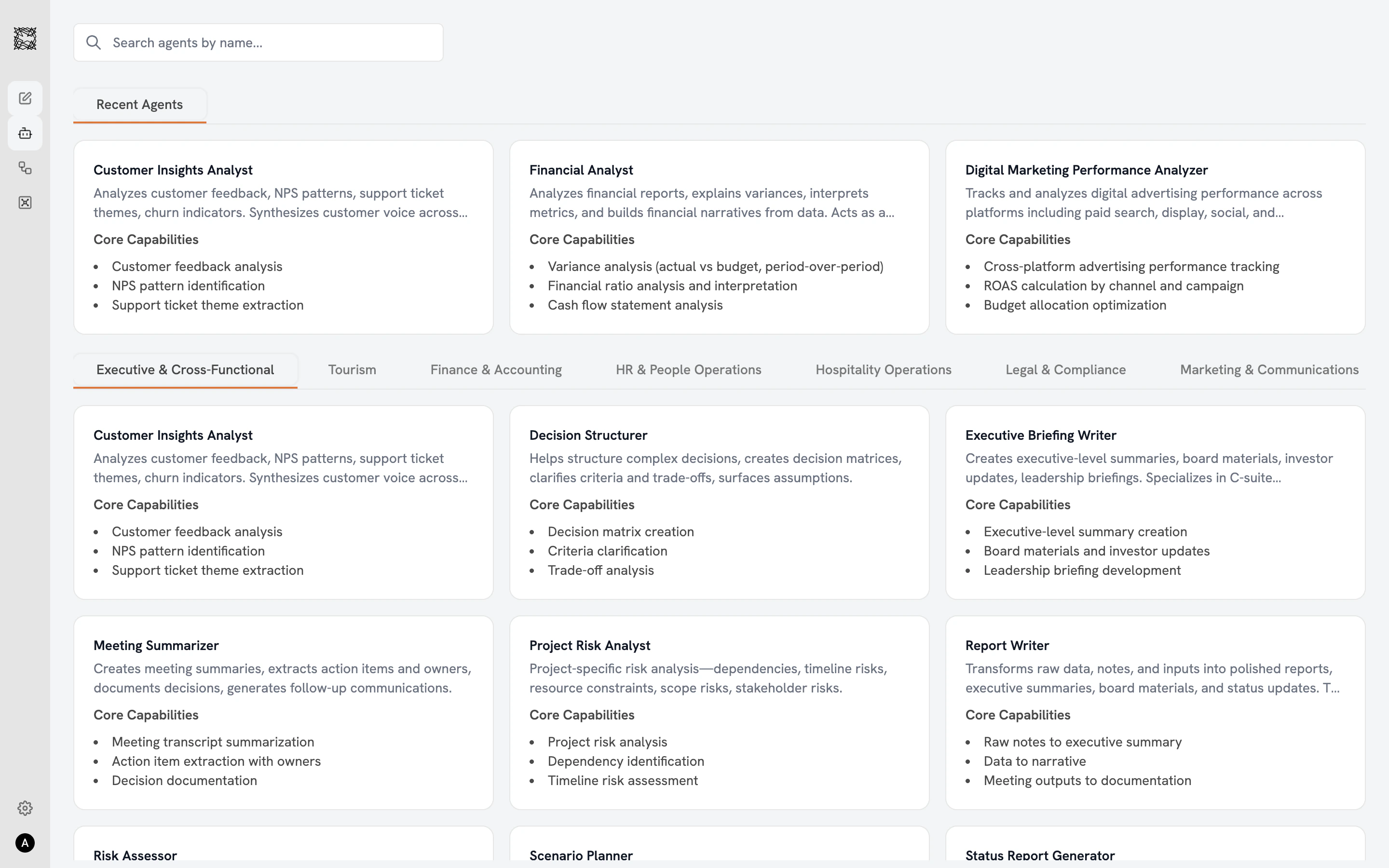
The Agent catalog page displays your Agents in a three-column grid. A **search bar** at the top lets you find Agents by name. A **"Recent Agents"** row shows Agents you have worked with before (personalized per user). Below that, **department filter tabs** let you browse by function: Executive & Cross-Functional, Tourism, Finance & Accounting, HR & People Operations, Hospitality Operations, Legal & Compliance, Marketing & Communications, Operations & Procurement, Product & Technology, Strategy & Research, and Sales & Business Development.
Each Agent card on the catalog page shows the Agent's name, a one-to-two sentence description, and three to four core capabilities.
## What each Agent shows you
Click any Agent card to open the detail view:
* **Use Cases**: Five example prompts showing what you can ask this Agent.
* **Core Capabilities** (green checkmarks): The full list of skills this Agent brings to every conversation.
* **Limitations / Quality Standards** (red indicators): What to keep in mind when reviewing results. Some Agents note data requirements; others set quality benchmarks.
Click **"Work with Agent"** to start a new conversation.
Save notes about your role, department, and work preferences in **Settings > Personalization > Memories**. Your Agents reference these Memories in every conversation, producing results tailored to your context from the start.
## 11 departments, 77 Agents
| Department | Examples |
| -------------------------------- | -------------------------------------------------------------------- |
| **Executive & Cross-Functional** | Board prep, status reports, meeting summaries, strategic planning |
| **Sales & Business Development** | Proposals, account research, RFPs, partnership analysis |
| **Marketing & Communications** | Campaign analysis, engagement metrics, funnel tracking |
| **Finance & Accounting** | Budget analysis, financial reporting, tax research, treasury |
| **Product & Technology** | PRDs, feature specs, documentation, UX research synthesis |
| **HR & People Ops** | Job descriptions, onboarding, policies, training content |
| **Legal & Compliance** | Contract review, compliance analysis, privacy, regulatory research |
| **Operations & Procurement** | Vendor analysis, process documentation, quality, supplier risk |
| **Strategy & Research** | Competitive intelligence, market research, due diligence, trends |
| **Tourism** | Occupancy forecasting, revenue analysis, benchmarking, cost analysis |
| **Hospitality Operations** | Guest experience, maintenance, shift management, service standards |
Explore the full catalog organized by department
What to expect when you start a conversation
## Browsing the catalog
The Agent catalog page displays your Agents in a three-column grid. A **search bar** at the top lets you find Agents by name. A **"Recent Agents"** row shows Agents you have worked with before (personalized per user). Below that, **department filter tabs** let you browse by function: Executive & Cross-Functional, Tourism, Finance & Accounting, HR & People Operations, Hospitality Operations, Legal & Compliance, Marketing & Communications, Operations & Procurement, Product & Technology, Strategy & Research, and Sales & Business Development.
Each Agent card on the catalog page shows the Agent's name, a one-to-two sentence description, and three to four core capabilities.
## What each Agent shows you
Click any Agent card to open the detail view:
* **Use Cases**: Five example prompts showing what you can ask this Agent.
* **Core Capabilities** (green checkmarks): The full list of skills this Agent brings to every conversation.
* **Limitations / Quality Standards** (red indicators): What to keep in mind when reviewing results. Some Agents note data requirements; others set quality benchmarks.
Click **"Work with Agent"** to start a new conversation.
Save notes about your role, department, and work preferences in **Settings > Personalization > Memories**. Your Agents reference these Memories in every conversation, producing results tailored to your context from the start.
## 11 departments, 77 Agents
| Department | Examples |
| -------------------------------- | -------------------------------------------------------------------- |
| **Executive & Cross-Functional** | Board prep, status reports, meeting summaries, strategic planning |
| **Sales & Business Development** | Proposals, account research, RFPs, partnership analysis |
| **Marketing & Communications** | Campaign analysis, engagement metrics, funnel tracking |
| **Finance & Accounting** | Budget analysis, financial reporting, tax research, treasury |
| **Product & Technology** | PRDs, feature specs, documentation, UX research synthesis |
| **HR & People Ops** | Job descriptions, onboarding, policies, training content |
| **Legal & Compliance** | Contract review, compliance analysis, privacy, regulatory research |
| **Operations & Procurement** | Vendor analysis, process documentation, quality, supplier risk |
| **Strategy & Research** | Competitive intelligence, market research, due diligence, trends |
| **Tourism** | Occupancy forecasting, revenue analysis, benchmarking, cost analysis |
| **Hospitality Operations** | Guest experience, maintenance, shift management, service standards |
Explore the full catalog organized by department
What to expect when you start a conversation