> ## Documentation Index
> Fetch the complete documentation index at: https://docs.trusapien.com/llms.txt
> Use this file to discover all available pages before exploring further.
# Workflows
> Browse 71 multi-step Workflows across 11 departments: Agents working together to produce comprehensive deliverables
Some work needs more than one perspective. A competitive analysis benefits from market research, financial review, and strategic synthesis. A campaign plan draws on audience analysis, messaging strategy, and content planning. **71 Workflows across 11 departments** bring multiple Agents together to handle exactly this kind of work.
 ## Browsing the catalog
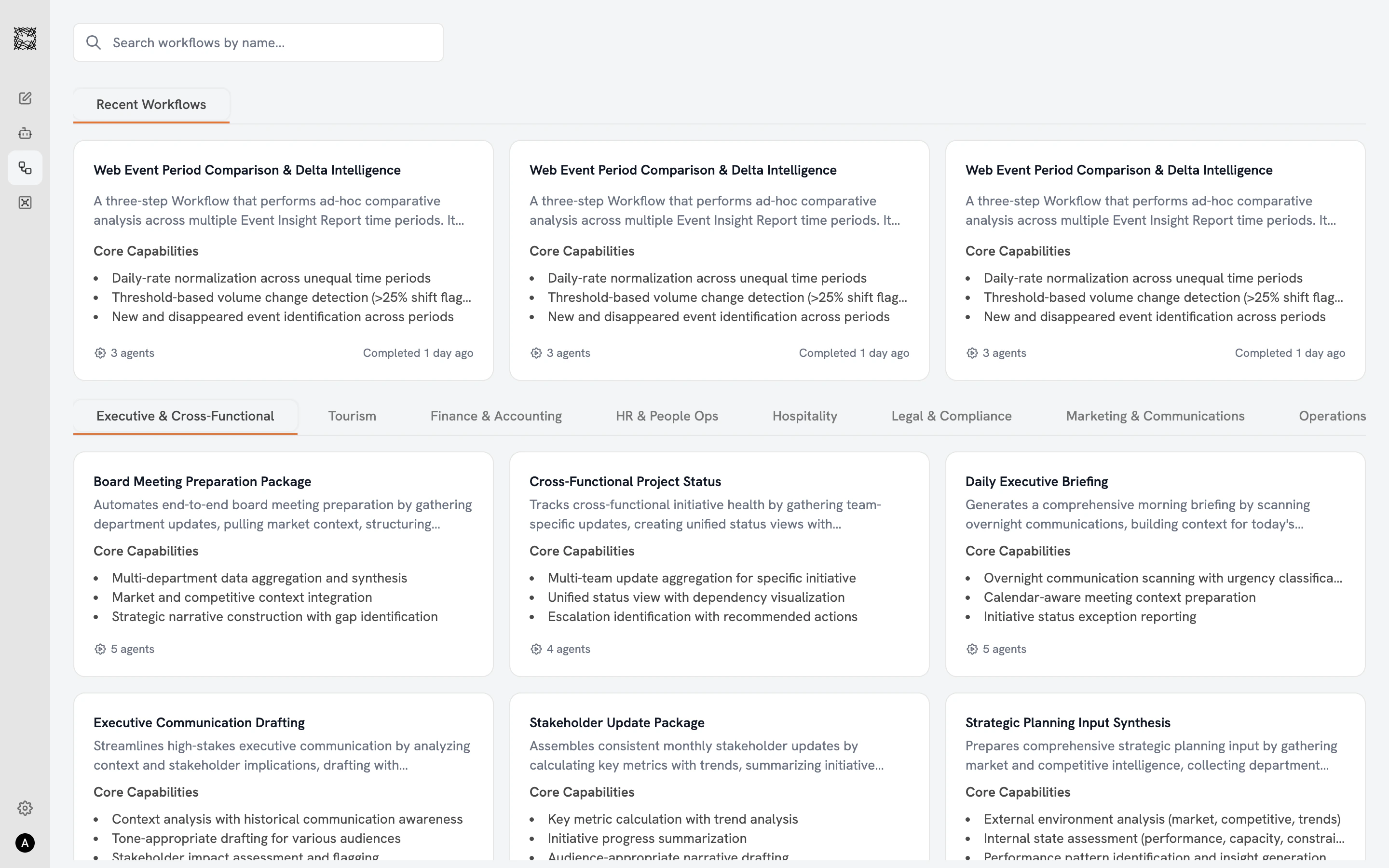
The Workflow catalog displays all 71 Workflows in a three-column card grid. A **search bar** at the top lets you find Workflows by name. The **"Recent Workflows"** row shows Workflows you have run recently (personalized to you). **Department filter tabs** across the top let you filter by function, matching the same departments as Agents.
Each Workflow card shows the Workflow's name, description, core capabilities, and an **Agent count badge** at the bottom (e.g., "4 agents"). Completed Workflows display a timestamp ("Completed 1 day ago"). Active Workflows show a green **"Running"** badge with progress ("Agent 1 of 4").
## Selecting a Workflow
Click any Workflow card to open the detail view:
* **Use Cases**: Four to five example prompts and scenarios showing when this Workflow is most valuable.
* **Core Capabilities** (green checkmarks): What this Workflow produces.
* **Limitations / Quality Standards** (red indicators): What to keep in mind when reviewing the deliverable.
Click **"Use Workflow"** to open the setup page.
## How Workflows differ from Agents
Workflows are built from the same specialist Agents you can work with individually. The difference is coordination: a Workflow brings multiple Sub-agents together with a shared purpose and passes context between them automatically. Each Sub-agent adds expertise that the next one inherits, building toward a comprehensive deliverable.
If you need a single Agent's perspective on one task, [work with an Agent directly](/agents/overview). If you need a comprehensive deliverable that requires multiple perspectives, start a Workflow.
Configure inputs, start a Workflow, and explore results
Work with individual specialist Agents
## Browsing the catalog
The Workflow catalog displays all 71 Workflows in a three-column card grid. A **search bar** at the top lets you find Workflows by name. The **"Recent Workflows"** row shows Workflows you have run recently (personalized to you). **Department filter tabs** across the top let you filter by function, matching the same departments as Agents.
Each Workflow card shows the Workflow's name, description, core capabilities, and an **Agent count badge** at the bottom (e.g., "4 agents"). Completed Workflows display a timestamp ("Completed 1 day ago"). Active Workflows show a green **"Running"** badge with progress ("Agent 1 of 4").
## Selecting a Workflow
Click any Workflow card to open the detail view:
* **Use Cases**: Four to five example prompts and scenarios showing when this Workflow is most valuable.
* **Core Capabilities** (green checkmarks): What this Workflow produces.
* **Limitations / Quality Standards** (red indicators): What to keep in mind when reviewing the deliverable.
Click **"Use Workflow"** to open the setup page.
## How Workflows differ from Agents
Workflows are built from the same specialist Agents you can work with individually. The difference is coordination: a Workflow brings multiple Sub-agents together with a shared purpose and passes context between them automatically. Each Sub-agent adds expertise that the next one inherits, building toward a comprehensive deliverable.
If you need a single Agent's perspective on one task, [work with an Agent directly](/agents/overview). If you need a comprehensive deliverable that requires multiple perspectives, start a Workflow.
Configure inputs, start a Workflow, and explore results
Work with individual specialist Agents