

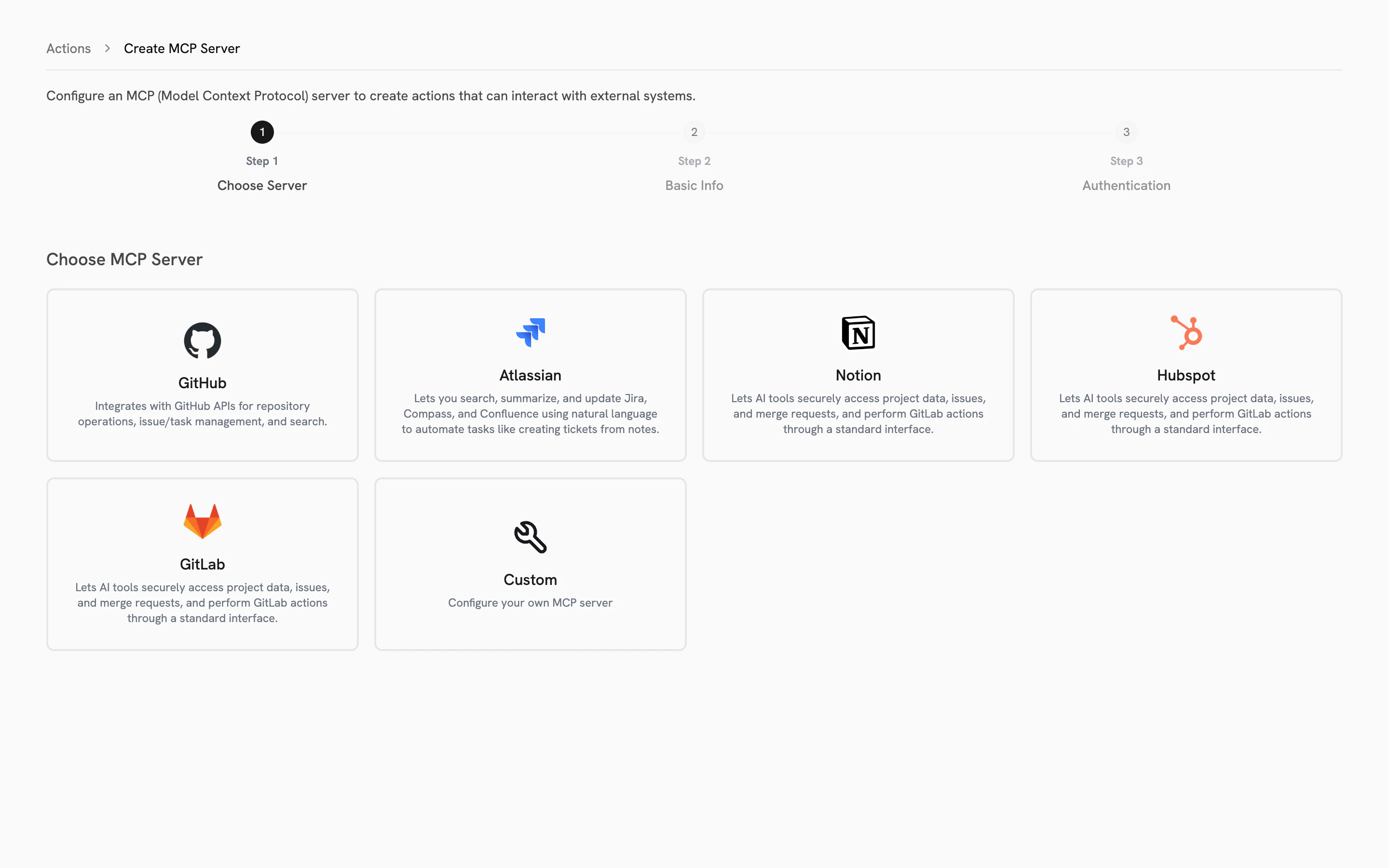
Pre-configured integrations
Five MCP servers are ready to connect out of the box. The connection URL and transport protocol are already configured. You only need to provide authentication.
You can also connect any custom MCP server for additional tools your organization uses.
Pre-configured integrations are a Trusapien differentiator. Most platforms require you to set up MCP connections from scratch. Trusapien’s five official servers come with pre-filled URLs and transport settings, so you only configure authentication.
Setting up an Action
The setup wizard walks you through three steps:1
Choose Server
Select from the five pre-configured integrations or choose Custom. Pre-configured servers display their name and a description of what they connect to.
2
Basic Info
Name your Action, add a description, and confirm the server URL. For pre-configured servers, the URL and transport (Streamable HTTP or SSE) are already filled in and locked. For Custom servers, enter your MCP server URL and select the transport.
3
Authentication
Choose from three authentication types: None (no credentials needed), API Token (enter your token), or OAuth (configure Client ID, Client Secret, and scopes). Pre-configured servers guide you toward the correct authentication method for that service.
Knowledge Grounding
Search your connected data sources
Connectors
Connect 39 data sources for Knowledge Grounding